📖 Zhenzhu: offline pop-up dictionary and manga OCR for Japanese and Chinese on the Mac
In brief
- 📖 Zhenzhu is a menu-bar dictionary for the Mac: select a word or hover over it and the definition appears beside it.
- 🖼️ A snip tool reads text in manga, games and PDFs with on-screen OCR.
- 🔒 According to the maker, JMdict definitions work offline; flashcards can be studied locally or sent to Anki.
- 💶 Free tier with monthly limits on cards and OCR reads; the full version is a one-time $29 ($9 with a code until December 1).
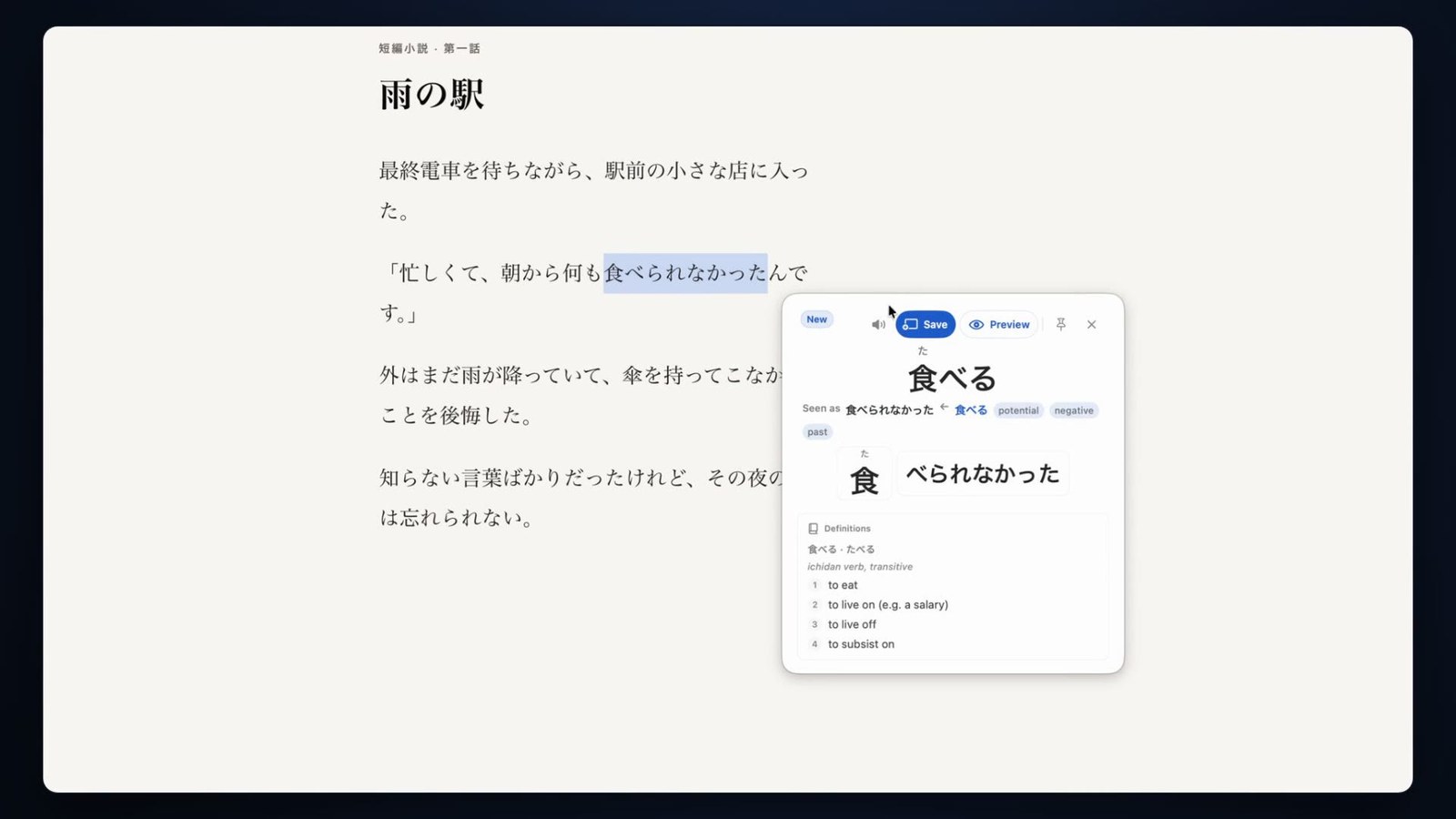
📖 Zhenzhu is a Mac app for learners of Japanese and Chinese. It runs in the menu bar and shows a dictionary popup beside the text when you select it or hover over it, in any app: PDFs, Kindle, Discord, visual novels, manga or a paused anime scene. For text that exists only as an image, a snip tool uses on-screen OCR. According to the project page, definitions (JMdict), furigana and JLPT levels work offline. 💶 There is a free tier with monthly allowances and a one-time purchase for the full version. It needs macOS 15 or later.
**What the app does.** Browser extensions stop at the tab bar; Zhenzhu aims to work everywhere on the Mac. Select a sentence or hold the pointer over a word and it shows the reading, the dictionary form and the meaning. For verbs and adjectives it resolves stacked conjugations back to the dictionary form (deinflection) and shows furigana, grammatical tags and the JLPT level. Whole sentences can be broken down word by word and translated, and macOS voices read words or sentences aloud. You can also type or paste text, or drop an image, into the "Dictionary & Translate" window.
**Manga and games.** For text you cannot select, the page describes "Snip-to-Translate": draw a box on the screen and the app reads the text with OCR. The free tier includes 20 OCR reads a month.
**Studying.** Found words can be saved as a card together with the original sentence, a screenshot and audio. The app has built-in flashcards with FSRS scheduling; alternatively it exports through AnkiConnect to the Anki desktop app running locally on the Mac, including custom note types. The lookup history is searchable across Chinese and Japanese.
**Price and scope.** According to the maker, unlimited dictionary lookups, sentence translation and speech are free with no time limit. The free tier is limited to 15 newly mined cards and 20 OCR reads a month and the latest 30 history entries. The full version removes these limits and adds flashcard import and bulk card management. It costs $29 regular as a one-time payment covering three Macs (Japanese and Chinese); with the code BF2026 the page names a Black Friday price of $9 through December 1, 2026. Refunds are offered within 14 days.
**Permissions.** The page lists what the app needs access for: reading the text you select, enabling pixel-based lookup for manga, games and PDFs, optionally copying a selection briefly (the clipboard is restored) and optionally talking to Anki on your own Mac.
**Who it is for.** It suits people who read Japanese or Chinese on a Mac and do not want to switch windows to look words up. If you only read in a browser, an extension may be enough. The page gives no figures on OCR accuracy.