🖥️ Décor brings home-made HTML widgets back to the Mac, over the desktop at a keypress
In brief
- 🖥️ Décor puts a screen of widgets over the Mac desktop at the press of F12, much like Apple's former Dashboard.
- 🧩 Each widget is a folder of HTML, CSS and JavaScript that you can build, change and share by AirDrop or mail.
- 🤖 A construction kit with a simulator and a command line tool is also meant for AI coding agents.
- ⚠️ Still a pre-release, macOS 14 or later; no iCloud sync.
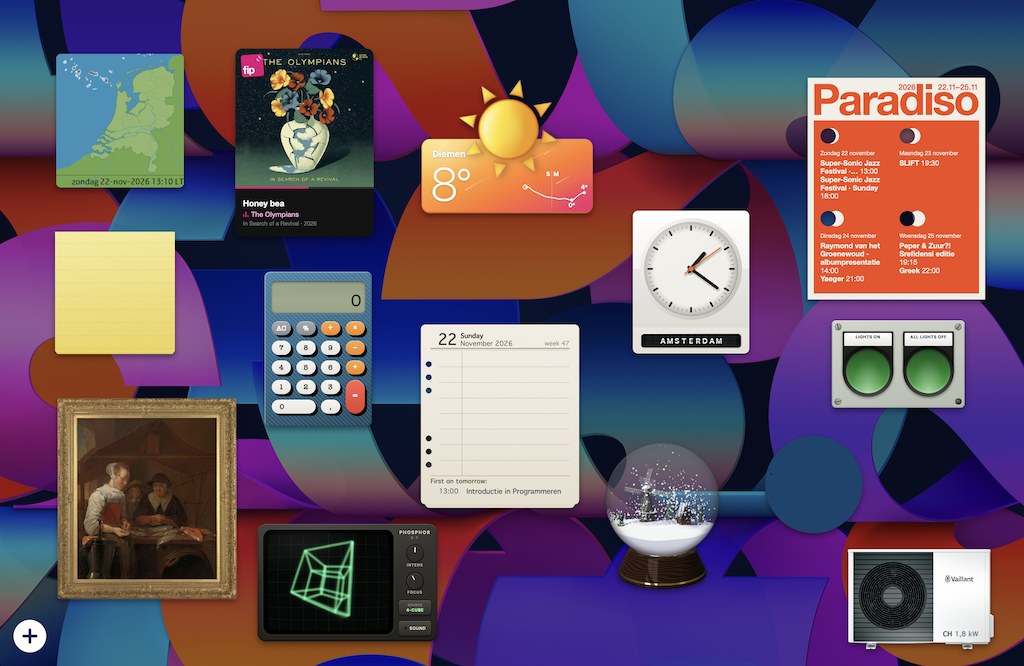
🖥️ Anyone who used Apple's Dashboard on the Mac will recognise the idea: [Décor](https://stgm.github.io/decor/) lays a screen of small programs over the desktop when you press F12, such as calendar, weather, clock or sticky notes, and hides it again at the next press. Widgets can be placed anywhere and resized. The heart of the project: according to its page, each widget is just a folder with an HTML file and a few extras. You can change existing widgets, write your own in a code editor or hand the job to an AI coding agent; a separate tool, the Widget Construction Kit, is made for that. Finished widgets can be passed on by AirDrop, message or email. ⚠️ Décor runs on macOS 14 and later, on Apple silicon and Intel Macs. The version on offer is explicitly not final and aimed at creative-minded developers who back up their computer daily. The page names no price.
🧩 **What comes with it.** Seven widgets are included: Calculator, Today (appointments), Clock, Weather, a board for macOS Shortcuts, Caffeine, which keeps the screen awake while you teach, for example, and Stickies. The project page shows further examples users can build: a painting from the Rijksmuseum, a concert venue's programme, the record playing on a radio station, a rain radar. Some older widgets are meant to work too and can be upgraded with the kit.
♿ **Using it.** Besides F12, a menu bar icon opens the screen. Widgets work with mouse, keyboard, VoiceOver, touch or a switch control; the page describes dedicated VoiceOver menus for adding and removing widgets.
🛠️ **The kit.** The Widget Construction Kit is a separate app with a template, a design guide and a simulator. The simulator runs a widget apart from your own screen with simulated personal data, reloads it on every change and shows errors in a console drawer; Safari's web inspector can be attached as well.
🤖 **Building with AI agents.** The kit includes a command line tool called wck that the page describes as well suited to coding agents. The agent uses it to open a new widget, take screenshots of it so it can "see" what it is doing, reload it, read the console or run a line of JavaScript to diagnose a problem. The tool also gives the agent the current API reference. The human watches the result in the simulator and gives feedback.
🔐 **What widgets may do.** Through a JavaScript object, widgets can reach the calendar, contacts, the Mac's location, system metrics such as CPU, memory and battery, regional settings and macOS Shortcuts. On macOS 26 and later they can use the system's local language model. Each widget has to declare the access it wants, and users see that list before installing and can say no. Some permissions are mutually exclusive to protect privacy and security, the page says, and network access runs through Décor's own engine, which limits resource use.
📌 **Who it is for.** Décor suits Mac users who want a quick glance at appointments, weather or their own small tools, and above all people who like tinkering with HTML or want an AI agent to build a widget for them. Anyone expecting a finished, stable product or settings synced across several Macs through iCloud should wait: settings live in the user folder and are only saved by normal backups. Questions and home-made widgets go to the project's forum.