🐧 Pop!_OS 26.04 LTS: System76 adds one-click themes, drawing tablets and automatic updates
In brief
- 🐧 System76 released Pop!_OS 26.04 LTS on November 24, the new long-term-support version of its Linux distribution, based on Ubuntu 26.04 LTS.
- 🎨 New "Constellations" are theme bundles that switch wallpaper, accent colours, icons and fonts in one click.
- ✍️ Drawing tablet support, an on-screen keyboard and optional automatic updates are added.
- 📅 Free to download; the upgrade from 24.04 only opens in December.
🐧 US computer maker [System76](https://system76.com/pop) released Pop!_OS 26.04 LTS on November 24, 2026. The free Linux distribution is now built on Ubuntu 26.04 LTS and ships the company's own COSMIC desktop, which, according to its [announcement](https://system76.com/blog/post/pop_os-26-04-lts-has-landed), has seen almost a year of feature work. 🎨 The most visible addition is called Constellations: bundled themes that change wallpaper, accent colours, icons and fonts at once instead of making users click through several settings pages. The system also supports drawing tablets with tilt sensitivity, offers an on-screen keyboard with touch and gamepad input, and can update itself if you let it. 📅 Pop!_OS is aimed at people who want a customisable Linux desktop for work, development or gaming. Users already on Pop!_OS 24.04 will know many of the new features, because COSMIC is updated continuously. System76 plans to switch on direct upgrades from 24.04 to 26.04 in December; until then it recommends a fresh install for the full release.
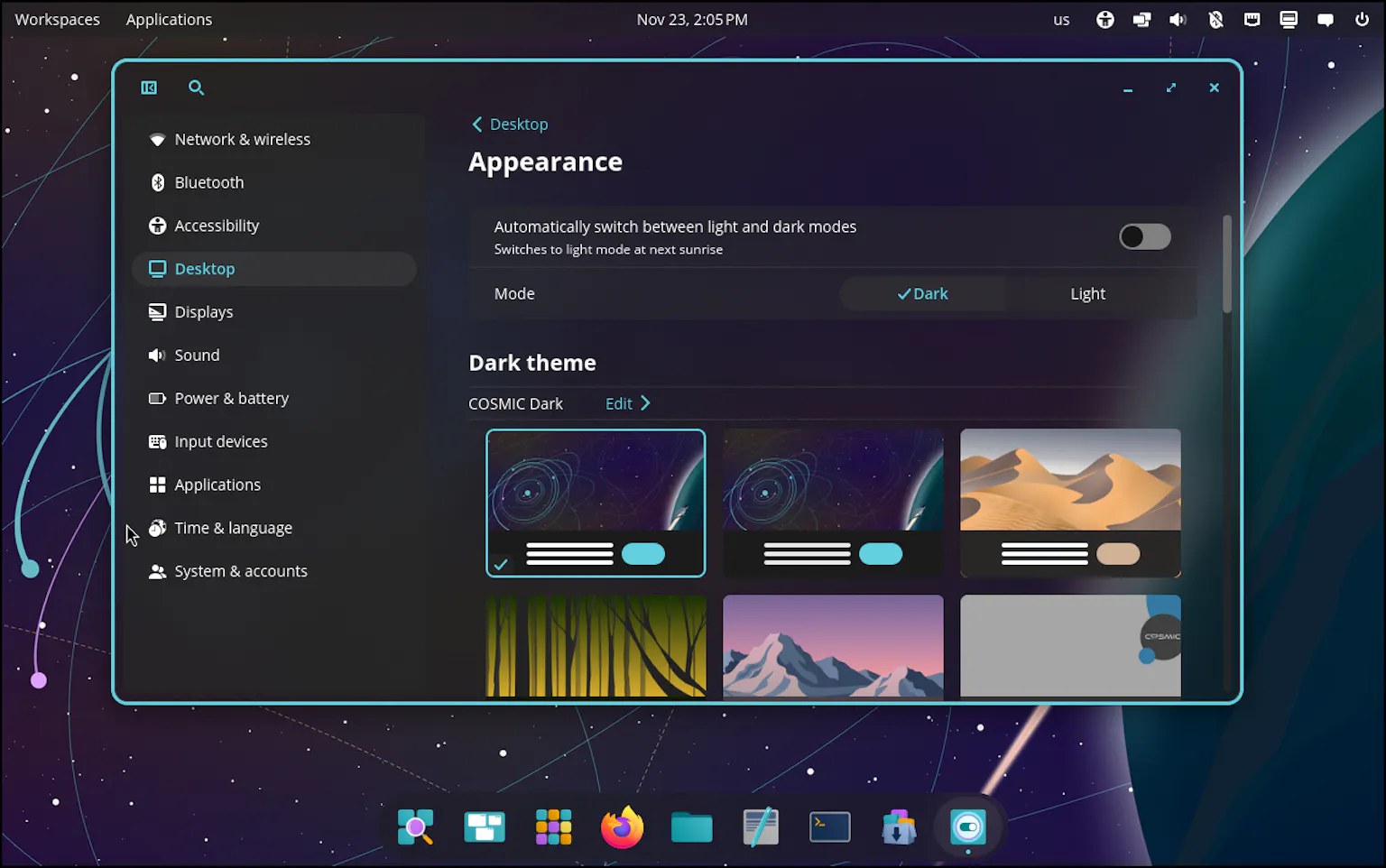
🖌️ How Constellations work. Until now a new look meant adjusting wallpaper, appearance, panel, dock and window management one by one. Now you go to Settings > Desktop > Appearance, choose light or dark mode, optionally the automatic switch between them, and then pick a theme. The bundles are not fixed: almost every part can be edited, the "Frosted Glass" effect can be laid over them, and the result can be exported as a backup or to share with others.
✍️ New ways to type and draw. Drawing tablet support, for devices such as Wacom's, brings pen input with pressure and tilt sensitivity. System76 lists graphic design, photo editing, animation, note-taking, CAD and geographic information systems as uses. The new on-screen keyboard works by touch and with a gamepad; the Linux site OMG! Ubuntu sees that as useful for running the system on a TV from the couch.
🔄 Updates and apps. Automatic updates can be switched on during setup or later under Settings > System & accounts. The family of native COSMIC apps gains the image viewer COSMIC Viewer and COSMIC System Monitor, and the COSMIC Store has been fully redesigned. According to the site Linuxiac, the release also adds remote desktop support, adjustable cursor sizes, better screen magnification and finding the pointer by shaking the mouse.
🎮 For gamers and laptops with two graphics chips. Games benefit from pointer constraints that keep the cursor inside the window, and machines with hybrid graphics pick the right GPU more reliably. Linuxiac gives the kernel as version 7.2.15; COSMIC is a desktop written in the Rust programming language that runs only on Wayland.
⚠️ What to know before switching. Because COSMIC is developed as a rolling desktop, the jump is smaller for Pop!_OS 24.04 users than the version number suggests. Anyone who wants 26.04 right away has to reinstall and should back up their data first; those who can wait get the upgrade in December. For people looking for a classic Windows-like desktop with nothing new to learn, Pop!_OS, with its automatic window tiling and many keyboard shortcuts, remains a world of its own. The system is free and, according to System76, fully encrypted and free of telemetry.