🖼️ Bowerbird: browse, tag and rate local images offline on Windows, Mac and Linux
In brief
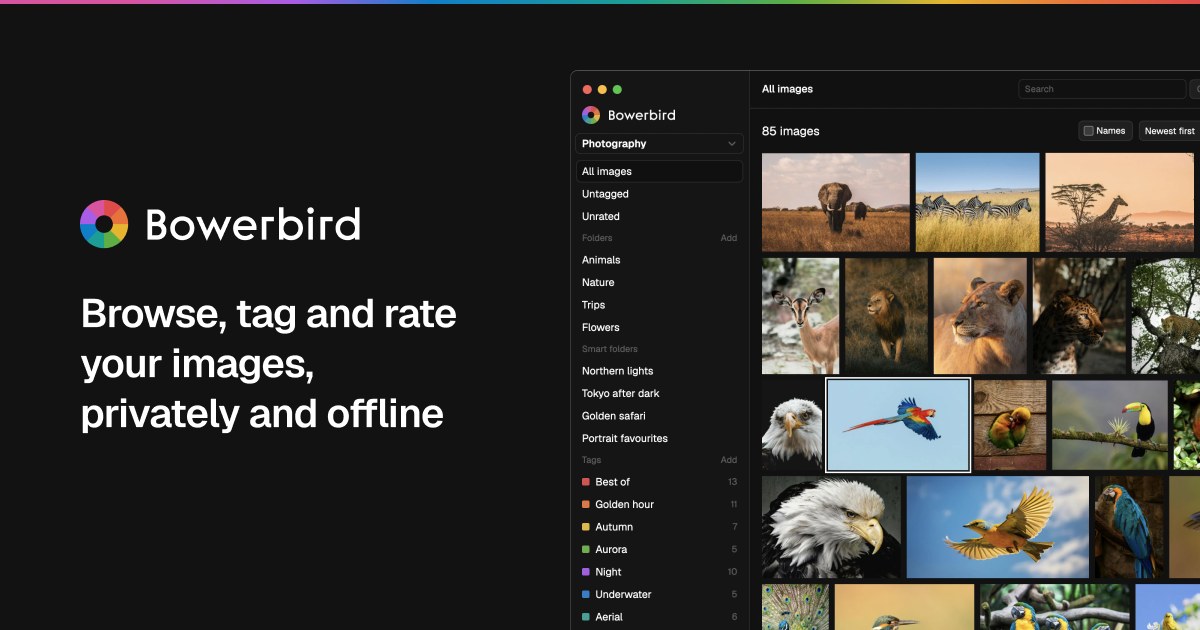
- 🖼️ Bowerbird is a desktop app that shows the images in a folder, subfolders included, in one grid.
- 🏷️ You add colored tags and 1 to 5 star ratings, then search, filter and save smart folders.
- 🔒 According to its page it never moves or changes your files, uses no account, cloud or analytics and no AI.
- 💳 It runs on Mac, Windows and Linux; a 14-day trial comes first, then a license is needed.
🖼️ Bowerbird is a desktop program for sorting through images you already have on your computer or an external drive. You point it at a folder and it shows everything inside, subfolders included, in one grid where each picture keeps its own shape. You then give images tags and ratings and find them again with search, filters and saved searches. According to the project page, the images stay where they are: Bowerbird never moves, renames, copies or deletes them, and keeps tags and ratings in its own library. It works on Mac, Windows and Linux and starts with a free trial of 14 days of use.
The app is made by the team behind [bowerbird.gallery](https://bowerbird.gallery). Its idea is simple: many people have thousands of photos and screenshots spread over folders and drives, and want to go through them quickly without importing them into a cloud service.
**How sorting works.** Keys 1 to 5 rate the selected images and 0 clears the rating, so a whole shoot can be rated in one go. Tags are colored, can be typed to find them or created on the spot, and can be added to a whole selection at once. Search covers file names, folders and tags, and can be narrowed by tag, file type, orientation (landscape or portrait) and rating (for example 3 stars or more). Any search can be saved as a smart folder that returns later, ready to change. Two views show what you have not sorted yet; images leave them as you rate or tag them. Thumbnails are created in the background, the ones on screen first.
**Libraries and files.** Work and personal images can be kept apart: each library has its own folders, tags, ratings and smart folders. The page says that ratings and tags belong to the image, not to its path, so they follow a file that you move or rename. Everything is stored in Bowerbird's own database file, library.db, and thumbnails live in the app's own folder, never next to your photos. If you remove a folder and add it back, its ratings and tags return. Supported formats are JPEG, PNG, GIF, WebP, AVIF, BMP, TIFF and HEIC/HEIF; HEIC and TIFF previews use the system's own thumbnailer, so they show on Mac and Windows, while on Linux those files are listed by name only.
**Privacy.** The maker states that there is no account, no cloud and no analytics. The app goes online only to activate the license and to check for updates; images and library never leave the computer. Bowerbird does not use AI: images are not sent to an AI service or used for training, and if AI features are ever added, they would run on the computer and stay off until switched on.
**Price and trial.** Bowerbird can be tried free for 14 days of use, with every feature and no limits on images or libraries, without subscription or account. After the trial the app asks for a license before it opens again; images stay untouched in their folders and ratings, tags and smart folders are kept until a key is entered. The page does not state the price in the text we could read, so check the purchase page before deciding.
**Who it suits.** It fits people who sort large image collections locally and want tags and ratings without a cloud. It is not a photo editor, and it is not meant to move or rename files for you.