🔒 Signal shields chats from system AI: screenshot block on iOS 27, screen-reading protection on Android
In brief
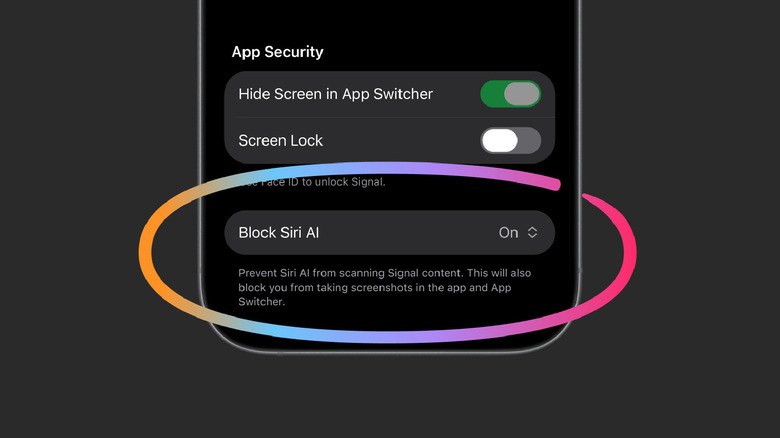
- 📱 On iOS 27 Signal blocks screenshots in the app to keep Siri AI out; a "Block Siri AI" toggle is shown enabled in settings.
- 🤖 On Android, "Screen security" turns on automatically when an AI assistant tries to read the screen.
- 🚧 Gaps: macOS, third-party agents using accessibility permissions, and access to files stored on the device.
🛡️ Signal announced on 20 November that it is shielding chats from the AI assistants built into mobile operating systems. On iOS 27 the app blocks screenshots so Siri AI cannot capture content. On Android, Signal turns on its Screen security setting itself when an AI assistant tries to read the screen. Signal calls AI agents an existential threat to private communication because content can end up on remote servers. Users can switch the protection off.
🖥️ The platforms differ: on Windows 11 Signal has blocked screenshots by default since last year to keep out Microsoft Recall. On Android it does not block screenshots outright because on many vendor builds it cannot reliably detect a screenshot attempt when screenshots are already restricted. On the Mac, Signal does not block Siri AI and suggests adding Signal to the excluded-apps list under System Settings > Siri.
Signal lists the limits openly: turning the protection off exposes the user's and their contacts' chats to agents; reads through the file system of content already stored on the device are not stopped; and third-party agents such as Meta's Muse that use accessibility permissions cannot be blocked. Engadget adds that the protection does not apply if the other person has disabled it on their device. Signal asks Apple, Google and Microsoft for better developer opt-out tools and clearer documentation, and says it is talking with Apple and Google about a system-level standard.