Skwirrel logs work expenses and mileage, with records kept on the phone 🧾
In brief
- 🧾 Skwirrel collects receipts, expenses and miles driven and exports an Excel file and a receipts PDF.
- 🔒 No account or cloud sync: according to the maker, records stay on the device.
- 💷 Free to download; exports and other extras are paid, with a £49.99 one-off option.
- 🚗 GPS trips and nearby fuel prices (UK only) are on Android only for now.
🧾 People who spend their own money at work, whether self-employed or employees claiming it back, can use [Skwirrel](https://skwirrel.salsa-apps.co.uk/) to photograph receipts, sort expenses into categories and measure trips. The result is an Excel workbook and a single PDF of a month's receipts, numbered to match, ready for an accountant or an expenses team. 📱 The app is on the App Store for iPhone and on Google Play for Android. It is free to download and use, while some functions require the paid Full Access. GPS trip measurement and the fuel station finder currently run on Android only; the maker says they will reach iPhone in the next update.
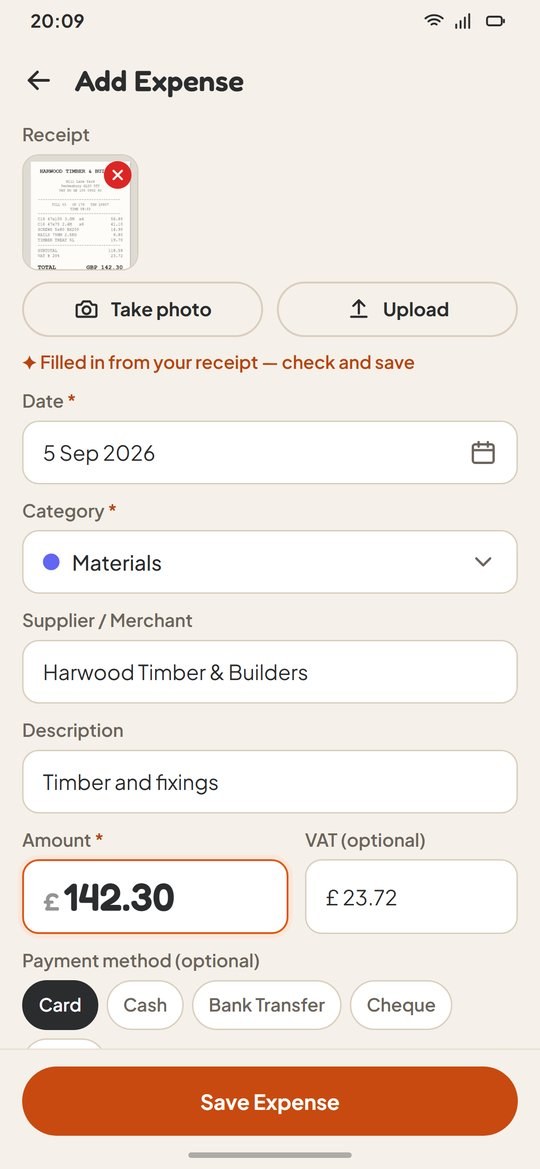
📸 The routine is deliberately short: open the app, record the expense, photograph the receipt, done. Instead of taking a new picture, users can upload one from the camera roll, as JPEG, PNG or PDF. Photos are compressed once on the way in and filed automatically, so there is no large photo library to manage. Custom categories get their own colour, which reappears on the chart, the calendar and every list.
🚗 For journeys, you tap Start trip, drive and tap End trip. The miles are measured and rounded up, the maker says the route itself is not stored, and the rate that applied to a trip stays locked to it. A feature called Nearby fuel shows the day's petrol and diesel prices from the UK government's Fuel Finder data, sorted by cheapest or nearest, with opening hours, directions and a one-tap way to log a fill-up. It is free but covers the UK only.
🔒 On privacy, the maker relies on storage on the device: no login, no cloud sync, no tracking software kit. The optional AI receipt reading sends only the photo you choose, and the page says it is not kept. The maker's description adds that it can split a receipt with several items, putting diesel under fuel and a sandwich under meals. Recording expenses and mileage, attaching receipts, the dashboard, exports and backups all work without a signal; only receipt reading and fuel prices need a connection. A backup bundles every record and receipt into one file that you store wherever you like and restore on a new phone.
💷 According to the page, Full Access covers earlier months, exports, unlimited receipt reading and GPS trips. If a subscription lapses, all data stays on the phone and you can keep adding entries and backing up; only those extras pause. Anyone who prefers not to subscribe can pay £49.99 once for a licence that never expires.
⚖️ Skwirrel says it is deliberately not an accounting package. It sets out to answer what you spent, what it was for, where the receipt is and how far you drove, then passes the rest on. People who need to write invoices or keep books will need something else, and iPhone owners who want trip measurement should wait for the announced update.