📍 Nuggets: iPhone app turns places, photos and appointments into an automatic diary
In brief
- 📍 Nuggets notices in the background where you have been and matches photos and calendar events to each stay.
- 🗺️ It builds a timeline, a heatmap, trends and a weekly review without you writing anything.
- 🔒 According to its makers everything stays on the iPhone: no account, no cloud.
- 📲 Free beta via TestFlight from iOS 15.5; Android has a waitlist.
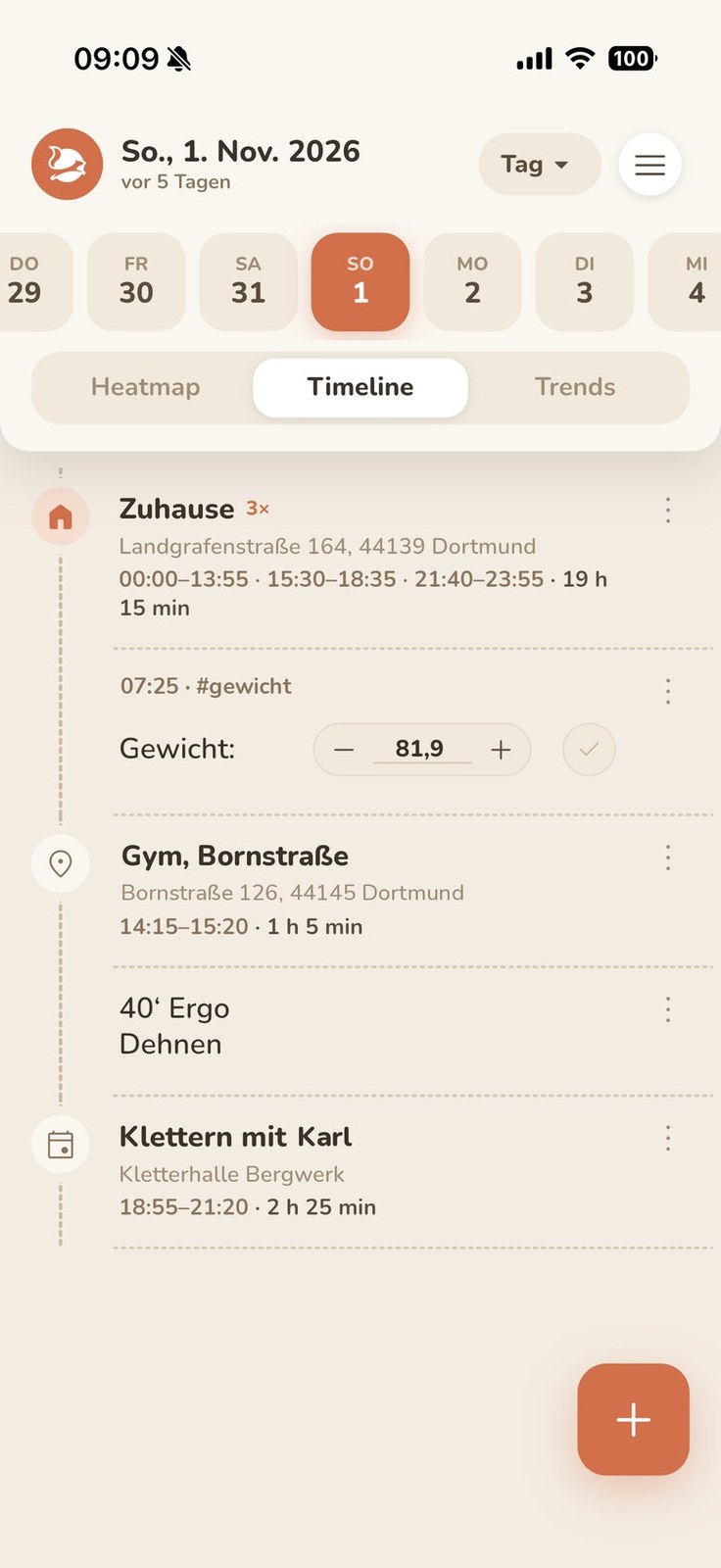
📍 The iPhone app [Nuggets](https://www.nuggets.website/) sets out to answer what you actually did last weekend without you keeping a diary. It runs in the background, recognises stays, routes and recurring places and, if you allow it, attaches the photos and calendar appointments that belong to each moment. From that it builds a timeline, a heatmap, weekly and monthly trends and a weekly review. 🔒 According to its makers, location history, places, photos and appointments are stored only on the device; there is no account and no cloud. The app is currently available as a free beta through Apple's TestFlight, runs on iOS 15.5 or later and comes in English and German. An Android version is in preparation, with a waitlist. It suits people who like to look back on their days but never write a diary; anyone who will not give an app permanent location access will not get along with it.
🧭 How a day is assembled. Nuggets lines up the day by itself: home, office, a new café and the routes in between, each with time, address and the photos taken there. A calendar entry is attached to the matching stay. The project page's example: a stay at "IKEA Dortmund" becomes "choosing a kitchen with Anna". Unknown places are named with one tap and recognised on the next visit. A note is possible but not needed.
🗺️ Heatmap and trends. Every stay becomes a dot on the map, and the longer you were somewhere, the larger it gets. Over a week or a whole year this adds up to a picture of your everyday life. The Trends view counts, per week and month, how much time you spent at home, how far you travelled and which places were new; the makers stress that the app passes no judgement on it.
🖨️ For printing. From a day, a trip or a year Nuggets creates a print-ready PDF, either as a heatmap poster or as a two-column journal with places and photos. Later, posters and booklets are meant to be printable straight from the app; that is planned as one of the optional paid extras.
🔐 Data and permissions. To detect stays without being opened, the app needs the "Always" location permission. For maps and addresses it only queries coordinates, the project page says; nothing leaves the app until you share a PDF or export your data yourself. Crash reports and anonymous usage statistics via Firebase are sent only with consent. Worth knowing: deleting the app deletes the data, but it remains part of the iPhone backup, local or in iCloud. That is also a limit: a new phone without a backup means an empty history.
💶 Price and status. The app is free and has no subscription; what is free today will stay free, the page says. Nuggets is not yet in the App Store but available as an open beta through TestFlight: you open the link on the iPhone and install it via Apple's testing app. The makers explicitly ask for feedback on what is missing. For Android and the regular App Store launch you can ask for a single notification.
🤔 Who it is for. Frequent travellers, people who like to sort memories or who simply want to know how often they visited their parents this year get a chronicle without effort. Anyone who does not want location data recorded permanently, or who needs sync across several devices, will find none of that in the current beta.