🌳 Skill Tree Training: a free workout log that unlocks the next exercise like a game
In brief
- 🌳 Skill Tree Training lays out 504 calisthenics, kettlebell and Pilates exercises as a skill tree.
- 🔓 Hit an exercise's target, such as 3 × 12 push-ups, and the next progression unlocks.
- 📱 Free and ad-free in the browser, no account needed to start; the log stays on your device.
- 🧭 Made for people who train on their own with bodyweight, a kettlebell or a mat, not for follow-along classes.
🌳 Skill Tree Training is a free training log that shows exercises not as a list but as a skill tree, the kind known from role-playing games. According to the page of its maker, Alfred van der Heide, the tree holds 504 skills on 98 lines in nine disciplines: push, pull, legs, core, cardio, kettlebell, Pilates, combat and acrobatics. 🔓 The idea is simple: you log reps, hold times and added weight. Every skill has a target, for example three sets of twelve push-ups in one session. Reach it and the next progression opens, from the incline push-up to the muscle-up, from the kettlebell deadlift to the Turkish get-up. 📱 The app runs in the browser on phone and computer, needs no account to start and keeps the log on the device. Training, the tree and the progress views are free and carry no ads; a free account is only needed for a backup and for using several devices. It is meant for people who want a set path from easy to hard. Anyone looking for follow-along classes or a coach who writes the plan is, by the maker's own words, in the wrong place.
🧭 **Getting started.** On first launch [Skill Tree Training](https://skilltreetraining.io/) asks what equipment you have, from nothing but the floor to a bar, rings or weights, and where you stand, with questions such as whether you can do five pull-ups. Each line then starts at a matching step. People who already train can mark any skill in the tree with "I can already do this"; that skill and everything before it count as mastered. New equipment such as parallettes or a weight belt can be added later, and more lines appear.
🏋️ **Programs and sessions.** There are six programs: push, pull, legs; full body; upper and lower; skills and strength; kettlebell; and Pilates, each with a cardio day. The app suggests the next day of the rotation and picks one exercise per line, on push day for example a push-up, a dip and a handstand. A guided workout counts down into each set; afterwards you confirm the reps or seconds completed and the rest timer starts. A short coach line says what to aim for based on the last session. According to the page, nearly every exercise has a demonstration video one tap away.
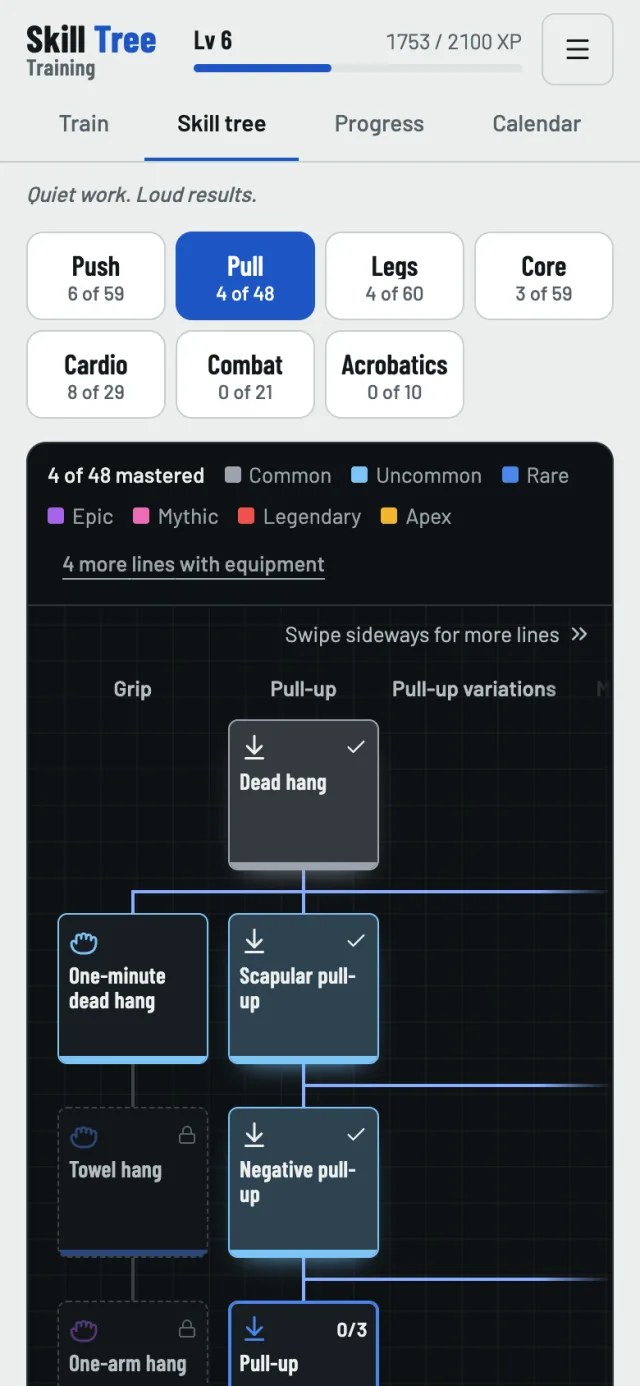
🌿 **How the tree branches.** Lines split as you get stronger: the push-up opens both the diamond push-up and the planche line. The first pull-up is reached through a dead hang (3 × 30 seconds), scapular pull-ups (3 × 8) and negative pull-ups (3 × 5), and the pull-up itself has a target of 3 × 8. The muscle-up opens only once chest-to-bar pull-ups (3 × 6) and dips (3 × 8) are mastered, and then asks for 3 × 3. Each skill sits in one of seven tiers from Common to Apex. Locked skills show what they still need; mastered ones stay filled in, so the tree doubles as a record of what you can do.
🔔 **Kettlebell and Pilates.** The kettlebell part has 61 skills, most with a single bell, built on the swing and the get-up. The examples on the page: deadlift 3 × 10 with 12 kilos, two-hand swing 10 × 10, Turkish get-up 5 × 1; presses, snatches, carries and double-bell work follow. Pilates covers 57 mat exercises, from the pelvic tilt and the hundred to the teaser and the jackknife. Targets there are one or two controlled sets; for cardio they are a distance or a time in one go.
📊 **Cardio and progress.** Next to strength work the app logs runs and other cardio with distance and time; the tree holds goals for running distance and for 5K and 10K pace. Strength and cardio have separate views: muscles trained this week, sets and training days, records, weekly distance and run pace. A month calendar shows each training day, and past days can be opened and corrected. Weights are entered in kilos; once you list the dumbbells, kettlebells or plates you own, the weight field steps through them.
🔒 **Data and origins.** According to the About page the app is hosted in the EU on the maker's own server, sets one session cookie when you log in and shows no ads; analytics are optional and stay off unless allowed. The maker says the exercise list draws inspiration from a 2021 community chart for bodyweight training, while the layout, icons, targets and the app itself are their own work and the chart's author is not involved. Alfred van der Heide also makes AI Garden Planner.
⚠️ **Limits.** The app is a training log, not medical advice. Every line starts with an easier version, and the app advises stopping each set one or two reps before failure; if something hurts, stop and see a doctor or physiotherapist. Anyone expecting a ready-made class to follow, personal coaching or weights in pounds will not find that here. Anyone who trains at home, in a park or at a gym on their own plan and wants to see which exercise comes next can try it right away in the browser without installing anything and add it to the home screen like an app.